Every client gets a unique referral link in their portal. When they share it and someone books using it, the referral is tracked automatically — and you can reward clients with an automatic credit when their referral completes.
How the referral link works
Each client has a personal referral link generated automatically the first time they visit their portal. They'll find it in their portal under Refer a friend. Sharing it is as simple as sending the link via text, WhatsApp, or social media.
The link opens your public profile page, so a friend who doesn't know you yet can read your bio, services and reviews before booking. MassageHub records the visit and ties it to the referring client, and the referral code follows them through to the booking page.
The three referral stages
- Invited — the referral link was opened, but no booking has come from that visit yet. We don't know who opened it, so there's no name to show — a name appears once a friend books
- Booked — the person who followed the link completed a booking
- Completed — the booked appointment was marked as completed
Status badges on the referral list use colour coding: red for invited, amber for booked, green for completed.
What clients see in their portal
In the Refer a friend section of the client portal, clients can see their unique referral link, a list of everyone they have referred, and the current stage of each referral. If they have an unused credit, a green banner shows the amount available and confirms it will be applied at their next booking.
When you have referral rewards switched on, the "How was your appointment?" email sent after each completed session also invites that client to share their personal link — so the ask reaches them at their most engaged moment, not just when they happen to open the portal. With rewards switched off, that email stays as it was.
What you see in the dashboard
Referrals show on your Dashboard home page, in the Client referrals card. It appears once your first referral link has been opened. Each row names the client who shared their link, with the friend underneath:
- link opened — not booked yet (red Invited badge) — someone opened the link but no booking has come from it yet, so there's no name. If the same friend opens the link again later on, you may see more than one of these rows
- referred Sarah Jones (amber Booked badge) — the friend has booked, so their name now shows
- Green Completed badge — the friend's appointment has been marked complete
Referrals aren't listed on individual client records.
Setting up referral rewards
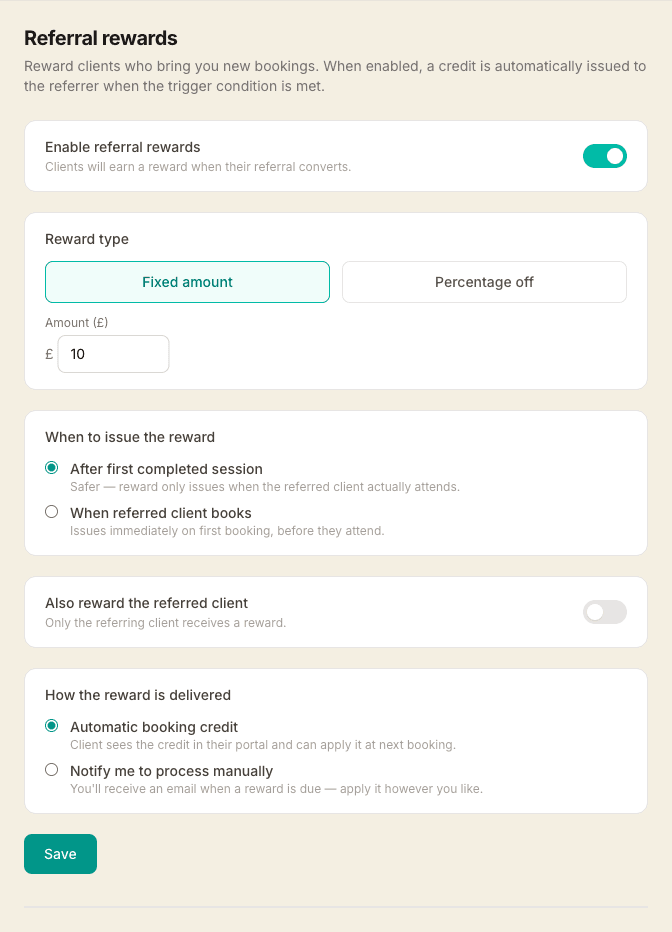
Go to Settings → Referrals to configure your reward program. You can choose:
- Reward type — a fixed amount off (e.g. £10), a percentage off (e.g. 10%), or a different fixed amount for each appointment length (e.g. £5 off a 60-minute, £10 off a 90-minute). With By length, you set a base amount plus a figure for each of your service durations; any length you leave blank uses the base, and the reward is based on the main treatment's length, so add-ons don't change it.
- Trigger — issue the referrer's credit when the referred client makes their first booking, or only after their first paid appointment is completed
- Also reward the referred client — when enabled, the same amount comes off the new client's first booking through the link — no code to type or remember. It shows the moment they pick a treatment: the price drops there and then, with a note of what they're saving, so "use my link and you'll get £10 off your first session" is true right in front of them — a much easier sell. It only applies to genuinely new clients, so an existing client can't reuse a link for a discount. With a by-length reward, both sides get the amount that matches the length each of them books.
- Delivery — the referrer's reward can be an automatic credit applied to their account, or a manual alert emailed to you so you can decide how to reward them
When a referral reaches the trigger condition, everything happens automatically. The referring client sees their credit in the portal and can apply it at checkout — the discount is shown throughout the booking wizard and reflected in the confirmed price.