Create promo codes that clients can enter at checkout to get a percentage or fixed-amount discount on their booking.
Creating a discount code
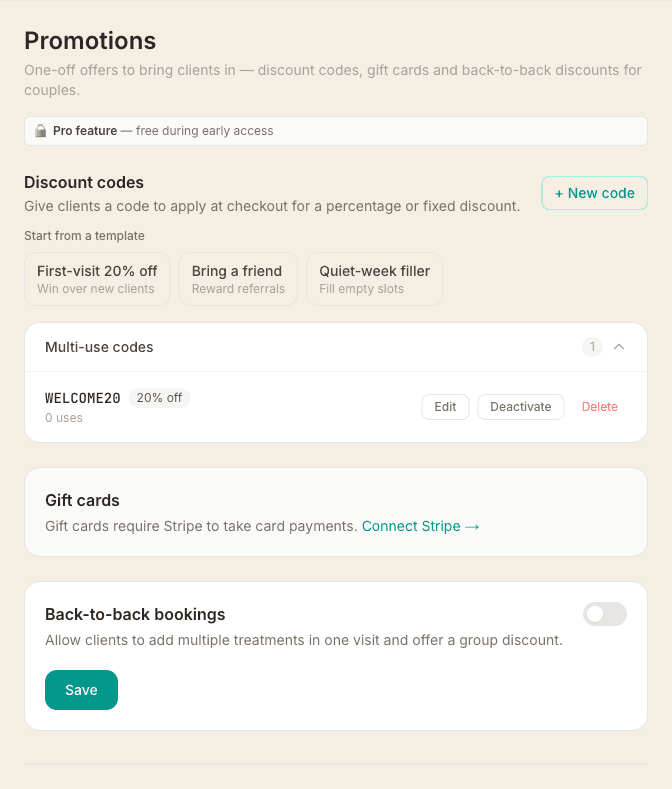
- Go to Settings → Promotions and find the Discount codes section
- Click + New code
- Enter a code name — it will be automatically uppercased (e.g. WELCOME10)
- Choose Percentage (e.g. 10% off) or Fixed amount (e.g. £5 off)
- Optionally set a max uses limit — the total number of times the code can be redeemed across all clients. Leave blank for unlimited
- Optionally set max uses per client — how many times each individual client can redeem the code. Set it to 1 for a one-per-client offer like a first-visit discount
- If you set a per-client limit, you can tick Limit resets every 12 months — handy for a code like HAPPYBIRTHDAY that each client uses once a year. Leave it off and the limit is for life
- Optionally tick Apply automatically at checkout so the code applies itself without the client typing anything — then choose who it's for: Everyone, or First-time clients only for a welcome offer (see below)
- Optionally set valid from and valid until dates to restrict when the code can be used
- Click Create code
Max uses and max uses per client work independently. A code could be unlimited overall but capped at one use each — or limited to the first 50 redemptions, whoever gets there first.
How clients use a code
At the payment step of booking, clients will see a Have a discount code? link. Clicking it reveals a text field where they can enter their code. Once applied, the discount is shown with the new price before payment.
Discount codes do not apply to membership credit or package session bookings — only to paid bookings.
Limiting a code to certain treatments
By default a code works on any treatment. If you'd rather it only applied to some — say 10% off massages but not your six-week programme — open the code and untick All treatmentsunder Which treatments?, then tick the ones it should cover. The list starts empty, so you tick what you want rather than untick what you don't.
The picker shows your active, non-private treatments — the ones a client can actually book. That has three consequences worth knowing:
- A private treatment can never be added to a scope — but a code with no limit set still applies to it.
- If you reactivate a treatment, it sits outside any scope you saved while it was switched off. Open the code and tick it.
- If you archive a treatment that a code is limited to, it stays in the scope but disappears from the picker — so the code carries on applying to nothing. The code list shows “Limited to treatments no longer on your menu” when that happens.
Duration variants are grouped, so ticking “Deep Tissue Massage” covers all of its lengths. One wart to know about: if you later add a new length to a treatment that's already scoped, the row still looks ticked but the new length isn't actually included. Untick it and tick it again to pull the new length in.
A limited code discounts the whole booking line, including any add-ons the client chose — the limit decides whether the code applies, not what it comes off. And codes aren't offered at all on back-to-back bookings, limited or not.
A limited code can't also apply automatically. The two are mutually exclusive: an automatic code is announced on your booking page before the client has picked anything, so it has to work on everything. Ticking Apply automatically clears the treatment limit, and a limited code won't let you tick it. That also means a limited code can't be a first-visit-only offer, since first-visit targeting lives inside the automatic option.
Applying a code automatically
Tick Apply automatically at checkout when creating or editing a code and clients don't have to type anything — the code applies itself at the payment step and they see “We've applied [CODE] for you” with the saving before they pay.
Clients also see the offer coming from the very first screen of your booking page, not just at the end. A green line above the first step tells them a discount is applied automatically with no code to type, and once they've picked a treatment it shows the exact amount they'll save. The code name itself is only revealed at the payment step, when it's actually applied.
Then choose the audience. Everyone applies it to every booking (pair it with an expiry date or usage cap so it doesn't run forever). First-time clients only applies it just for someone with no previous booking with you — ideal for a welcome offer. The first-visit check runs again when the booking is confirmed, so the code can't be used twice or by a returning client even if they reach checkout with it showing. If you offer more than one automatic code, the one giving the biggest saving is the one applied.
Because someone browsing your booking page hasn't given their email yet, MassageHub can't tell whether they're new to you — so a First-time clients only code is worded as a question up there: “First time booking with [you]? You'll get 20% off.” A regular client reads that and knows it isn't theirs, so nobody is shown an offer that's then taken away. If a client is signed in and you've seen them before, the line doesn't appear at all.
Applying a code to an existing booking
If a client mentions a code after they've already booked — or you took the booking yourself over the phone — you can apply it for them. Open the appointment, and under the price tap Apply discount code. The dropdown lists only the codes that client can actually use right now for this treatment (general codes they're eligible for that aren't limited to other treatments, plus any loyalty reward they've earned), each showing the exact amount it takes off this booking. If a code is hidden because it doesn't cover the booked treatment, the panel says so. Pick one and tap Apply; the saving is shown on the appointment and the reduced total is what gets charged.
The code is only counted as used when you mark the appointment complete, so a booking that's cancelled or no-showed never uses up a one-per-client or single-use code. To take it off again before charging, tap Remove code. You can't apply a code to a booking that's already been charged, paid in cash, or has a manual price adjustment — remove the adjustment first. It works the other way too: when a code is refused because it doesn't cover the booked treatment, a manual price adjustment is the way to give the discount anyway. It records no code against the booking and never uses up a one-per-client or single-use limit.
Managing codes
Each code in the list shows its discount, how many times it has been used, and its usage limit (if set). You can Deactivate a code at any time to stop it being accepted — or Activate it again later. You can also Delete a code permanently (this cannot be undone).
Tips
- Use expiry dates for seasonal promotions (e.g. Black Friday, January offers)
- Set max uses per client to 1 for a "first booking" welcome offer that can't be reused
- For a yearly treat, set max uses per client to 1 and tick Limit resets every 12 months — one code that quietly works year after year
- Deactivate rather than delete so you keep the usage history