Green booking incentives let you highlight — and optionally discount — appointment slots where you're already in the area. This rewards clients who help reduce your travel time, fuel costs, and carbon footprint.
Setting up green bookings
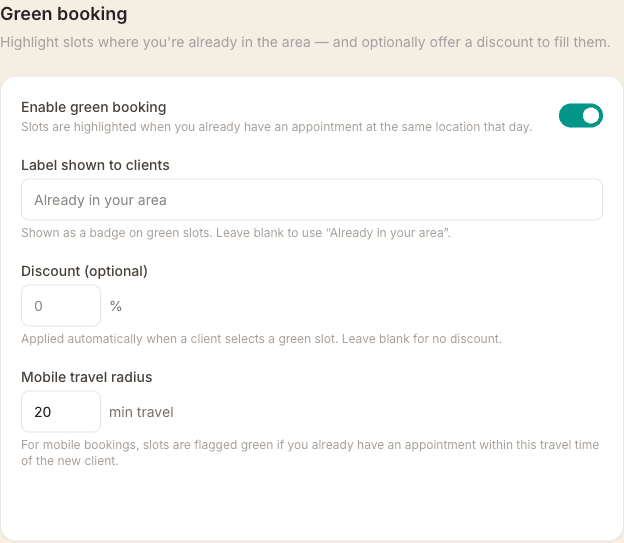
Go to Settings → Locations, open your mobile location, and scroll to Green booking.
- Enable green booking — toggle on to activate the feature
- Label — the text shown to clients on green slots (e.g. Already in your area). Leave blank to use the default.
- Discount % — an optional percentage off for clients who book a green slot (e.g. 5%). Set to 0 to highlight slots without discounting.
- Nearby radius — the maximum travel time (in minutes) between your existing appointment and the new client before the slot qualifies as green (default: 20 minutes)
How green slots work
When a client books a mobile appointment and enters their address, MassageHub checks your existing confirmed appointments for that day. If another mobile appointment is nearby — within your configured radius — the adjacent slots are highlighted in green.
Green slots appear with an emerald dot on the date picker and a green leaf banner on the time picker. If you've set a discount, it's shown as a strikethrough on the original price and applied automatically at checkout.
Back-to-back bookings and green slots
Green discounts work alongside back-to-back bookings. The green discount is applied to the first service (the one in the green slot), then any multi-treatment discount is applied to the combined total on top.
What clients see
Clients see the green label you configured (or Already in your area) and the discount percentage on both the calendar and the slot picker. The booking summary shows the green discount as a separate line before the total, so it's clear what they're saving and why.