Burnout and repetitive strain injuries end careers — studies put the burnout rate for massage therapists at 49–73%. MassageHub's wellbeing suite enforces your limits at the booking level, before overwork happens. Slots that would take you over a limit are hidden from clients automatically. They just see the day as fully booked.
All limits are optional and off by default. Go to Settings → Health & wellbeing to configure them.
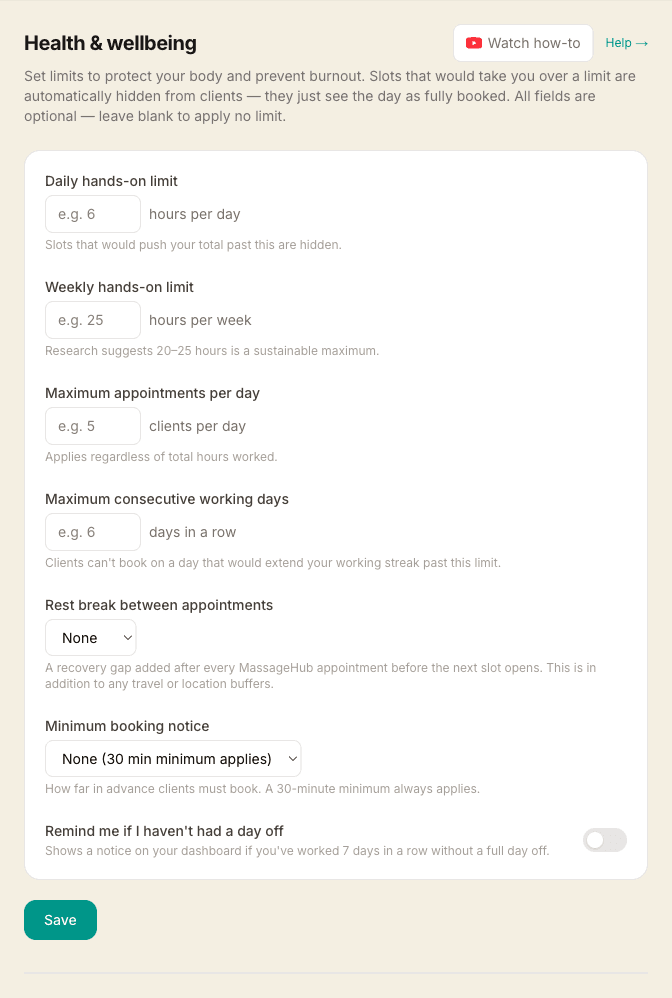
Daily hands-on limit
Sets the maximum total hands-on time per day. Once confirmed appointments for that day reach this total, no further slots are shown to clients. The limit counts only MassageHub-booked appointments — time off entries and external calendar events do not count.
Recommended starting point: 5–6 hours. Most professional bodies suggest no more than 6 hours of continuous bodywork in a single day. If you do a mix of short and long treatments, the daily hour limit is often more useful than an appointment count.
Weekly hands-on limit
Sets the maximum total hands-on time across the ISO week (Monday–Sunday). This is the single most important limit — industry research consistently puts the sustainable maximum at 20–25 hours of hands-on massage per week for a full-time therapist.
When the weekly total is reached, all remaining days in that week show no available slots. The counter resets at midnight on Monday.
Maximum appointments per day
Caps the number of clients per day regardless of session length. Useful if mental fatigue — rather than total hours — is what limits you. For example, you might be comfortable with four 90-minute sessions but not eight 45-minute ones.
The daily appointment cap and the daily hour limit work independently. If either is reached, the day shows as fully booked.
Maximum consecutive working days
Prevents clients from booking on a day that would extend your working streak beyond this number. A "working day" is any date with at least one confirmed MassageHub appointment.
Example: Set to 5 days. You have confirmed appointments Monday through Friday. Saturday will appear unavailable to clients because booking it would make day 6. Once Sunday passes with no appointments, the streak resets.
The check looks backwards — it counts confirmed appointments on consecutive days leading up to the requested date. Cancellations break the streak.
Rest break between appointments
Adds a recovery gap after every MassageHub appointment before the next available booking slot opens. This is in addition to any travel or location buffers — it is pure recovery time.
Example: A 60-minute appointment ends at 11:00 with a 15-minute location buffer and a 30-minute rest break. The next available slot would be 11:45, not 11:15.
Rest breaks apply only to MassageHub appointments, not to GCal, iCal, or Fresha imports. This is intentional — external events already include their own buffers.
Minimum booking notice
Requires clients to book at least this far in advance. Slots within the notice window are hidden from the booking page — the calendar greys out affected dates and the time picker skips slots that fall within the cutoff.
A 30-minute minimum always applies regardless of this setting (clients can never book for right now). Setting minimum notice to, say, 24 hours means no same-day or next-morning bookings.
Useful if: you need preparation time before mobile appointments, prefer not to take last-minute bookings, or want to avoid the stress of very short notice.
Rest day reminder
When enabled, your dashboard shows a gentle notice if you have had confirmed appointments on every one of the past 7 days with no full day off. This is advisory only — it never blocks bookings. Think of it as a nudge, not a lock.
Post-session energy log
After each completed session, the appointment panel shows "How did that session feel?" with three options: Great, Tired, or Exhausted. Tap one to record it. You can change your rating at any time by reopening the appointment.
Ratings are private — clients never see them. Over time they build a personal trend visible on your wellbeing dashboard card, helping you spot patterns (e.g. Thursdays consistently leaving you exhausted) before they become injuries.
Wellbeing dashboard card
Your main dashboard shows a "Your wellbeing" card once you have any limit configured or have had an appointment in the last 7 days. It shows:
- Hands-on today / this week — with a colour-coded progress bar (green → amber at 75% → red at 100% of your limit)
- Appointments today — progress toward your daily cap
- Estimated travel this week — based on mobile appointments and their location buffers
- This month — total sessions and hands-on hours
- Recent energy trend — average of your last 7 rated sessions shown as a colour dot
- Rest day reminder — banner if you haven't had a day off in 7 days (only when the toggle is on)
Use the Settings → link in the card to adjust your limits at any time. If you'd rather not see the card, tap the × in its top corner to hide it. Your limits keep working either way, a one-line warning still appears if you go over a limit or miss a day off, and it stays hidden on that device. To bring it back, open Settings → Wellbeing and tap Show it again.
How limits interact
All limits are checked independently. If any one of them is reached for a given date, that date shows as unavailable. Clients never see which limit was hit — they just see no available slots or a greyed-out day on the calendar.
Limits are checked again at booking time (not just when slots are displayed) to prevent two clients booking the last slot simultaneously.