Intake forms are health questionnaires sent automatically to clients before their appointment. You can have one default form for all bookings, and additional forms assigned to specific services or locations.
Managing your forms
Go to Intake forms in the nav to see all your forms. Each form shows its assignment — Default, or which service/location it's tied to. Click + Add form to create a new one, or Edit to update an existing form.
Back-to-back bookings
When a client books several sessions in a row, the whole booking shares one intake form. You don't send a separate form for each session, and they don't receive several.
The form lives on the earliest session that is still going ahead. Open that one to send it, or to create a shareable link for other people coming along. On the later sessions you'll see a line pointing you to the session that holds the form, and tapping it takes you straight there. When the form comes back, it shows on that same session, so there's one place to look rather than one per booking.
Why your client gets two emails
For a back-to-back booking, the confirmation and the intake form arrive as two separate emails, one after the other. That's deliberate. Someone booking several sessions is often booking for several people, and the confirmation is the message they're most likely to forward on. Their form link is personal — it opens their own form and can only be used once — so keeping it out of the forwardable email means passing on the confirmation can't accidentally hand their form to someone else.
If other people are coming and each needs their own form, use a shareable link instead, below.
Which address the form goes to
A form link always goes to the email address saved on the client's record, not to whichever address was typed into the booking form. Bookings are matched to a client by mobile number, so if two people share a phone, the second one to book is still reaching the first one's record. Sending to the saved address means a booking made on someone else's number can't redirect their form to a different inbox.
If a client books online and their record has no email address saved, the link comes to you instead, with a note asking you to pass it on. That happens when a record was set up from a phone number alone — either brought over from another system, or created when you added a booking yourself. Add their address to their client record and future forms will go straight out to them.
When you add a booking yourself for a client with no email saved, nothing is forwarded to you, so they get no confirmation and no form. With Send confirmation email ticked, the booking form shows a No email on file box instead. Type their address there and tap Add email, and the confirmation goes out with that booking, along with their intake form if one is due.
When a form stops working
If you cancel a booking, or mark it as a no-show, the form that went with it stops working. Anyone opening the link sees a short note saying there is nothing to fill in, the same way a shareable link pinned to that booking does. If they had already sent their answers, those stay on the client's record and they will still see that you received them.
Sharing a form with a group
Sometimes the people who need to fill in a form haven't booked with you — a class, a workshop, a corporate day, or a couple where only one person booked. On the Intake forms page, tap Create a shareable link on any form to get a web address you can send to everyone at once.
It's the same link every time, so you can put it in a group chat, on a sign-up sheet, or on a poster. Everyone who opens it fills in their own separate copy. They don't need an account, a booking, or a link of their own.
The form asks for their name, mobile number and email before the questions. If the mobile matches someone already on your client list, their answers are filed on that record. If it doesn't, a new client is created for you automatically. Either way you get an email as soon as someone completes it, showing the name they typed.
Nothing on an existing client record is ever changed by someone filling in a shared link. If the name or email they give differs from what you hold, the form tells you and leaves the record alone — you decide whether to update it.
You've got two controls on each link. The toggle stops it accepting responses without deleting anything, so anyone opening it is told politely that it's closed. Replace with a new link gives you a fresh address and kills the old one immediately — use it if a link has been forwarded further than you intended.
You can also share a link for one specific appointment. Open the appointment in your calendar and look for Booked for a group? — forms filled in through that link are listed on the appointment itself, so a group booking's paperwork stays together. That link stops working automatically if the appointment is cancelled.
From there you have two ways to get it to people. If the client's record has a saved email address, Email the link to their name sends it straight to whoever made the booking, so they can forward it to everyone coming with them — they know who that is, and you probably don't. It goes to the address on their record, not one typed at booking. Either way you can create the link and copy it, if you would rather send it yourself on WhatsApp or wherever suits — which is the only route if you have no email address saved for them.
The email we send them carries the group link and nothing else. It deliberately does not include their own form link, because that one is personal and can only be used once — if it were forwarded, someone else's answers would land on their record and they would be locked out of their own form. It also leaves their name out, since a forwarded email carries everything in it. It does say which session it is for, so nobody receiving it thinks it is spam.
If you have switched a link off, sending it is refused rather than going out quietly — you will be told to turn it back on first, using the toggle on the link itself.
A form with no questions can't be shared until you add some.
Seeing a form once it comes back
Open the appointment in your calendar. Before the client has filled anything in you'll see Send intake form at the top of that group of buttons, with Email the link to their name and Create a shareable link side by side underneath, for anyone else coming along. The moment their answers arrive, that top button becomes View intake form and takes you straight to what they wrote.
Deleting a single response
Open any completed form and you'll find Delete this form at the bottom. It removes that one set of answers permanently and leaves the client record and the appointment untouched. It's there so you can honour a request to erase someone's health information even when they aren't a client of yours — which happens with shared links, where somebody may have filled in a form without ever booking.
Which form gets sent?
When a client books, MassageHub picks the most specific matching form:
- Service-specific — if a form is assigned to the booked service, that form is sent
- Location-specific — if a form is assigned to the booked location, that form is sent
- Default — if no specific match, the default form is sent
Only one form is ever sent per booking.
Not sure which form a service uses? On the Intake forms page, open Which form does each service use? to see every service listed with the form it sends — its own, your default, or nothing if that form has no questions yet. It's a quick way to catch a service quietly falling back to the default when you meant it to have its own. Remember each duration of a treatment is a separate service, so a form must be assigned to each one.
Creating a form
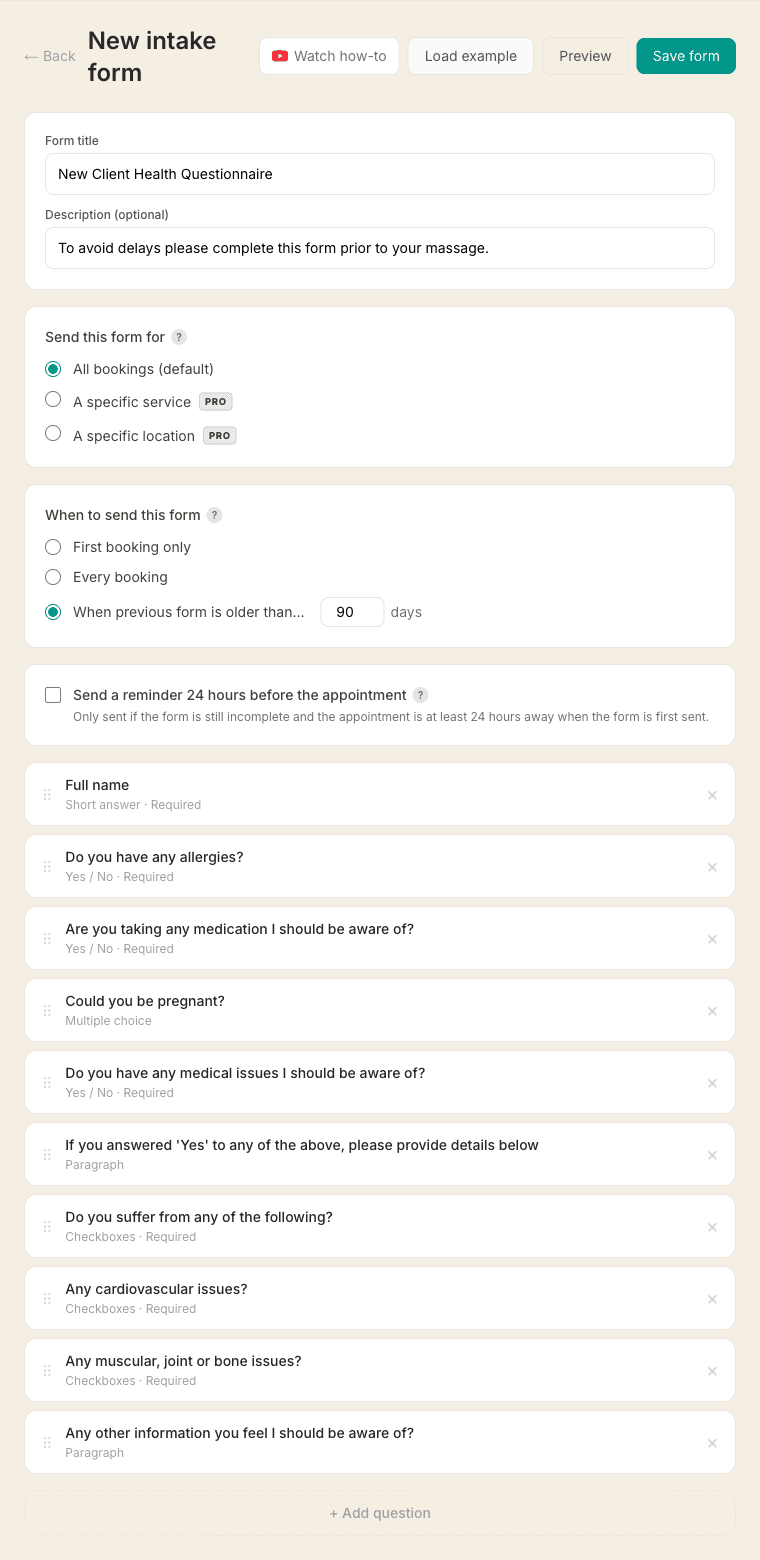
When creating or editing a form, choose what it's for:
- All bookings (default) — sent whenever no more specific form matches
- A specific service — sent only when that service is booked
- A specific location — sent only when a client books at that location
- Not assigned yet — kept as a draft; it won't be sent automatically until you make it the default or assign it to a service or location
Duplicating a form (the Duplicate button on the Intake forms page) creates an editable copy that starts “Not assigned yet”, so your original form and its assignments stay exactly as they were. Rename the copy, adjust the questions, then assign it when you're ready.
Field types available: Short text, Long text, Yes/No, Multiple choice, Checkboxes, Date of birth, Body map.
Date of birth
Choose Date of birth and your client gets a date picker rather than a text box, so you never have to work out whether “03/04” means March or April. Tick Required and they can't send the form without it.
Their age is worked out for you. It shows at the top of the completed form and next to the answer itself, on screen and on the PDF, and it is always current — it is calculated the day you look at it, not the day they filled the form in.
If the client's record has no date of birth saved, the one they give fills it in. If you already have a date on their record, that stays exactly as it is: yours always wins, so a correction you made by hand can't be undone by a later form.
Body map
Choose Body map and your client sees a front and back diagram, and taps the areas they'd like you to work on. There's nothing to set up — the areas are already on the drawing, so there are no options to type in.
Their choices come back to you as a picture and as words. The completed form shows the same diagram with their areas filled in, followed by a list like “Right shoulder (front), Lower back” — and that list is what appears on the PDF and in your data export, so a printed copy always says the same thing as the screen.
Left and right are labelled from the client's point of view, the way a paper body chart is, and each diagram is marked R and L so nobody has to guess. Tapping the wrong spot is easy to fix: every area they pick appears underneath as a tag they can tap to remove.
When the form is sent
Each form has its own send frequency:
- First booking only — sent once per client for that form. It stops being sent once they have completed it. A form they never completed does not count as done, so if that booking was cancelled or marked as a no-show, the form goes out again on their next booking. Deleting a booking takes its form out of this count altogether
- Every booking — a new form link with every appointment confirmation
- After X days — re-sent if the client's last completed submission of that form is older than the set number of days (default 90)
24-hour reminder
Each form has an optional toggle to automatically email the client a reminder 24 hours before their appointment if they haven't completed the form yet. Sent once per appointment — turn it on per form.
You'll be notified when it's submitted
When a client completes a form, you'll get an email with a link to view their responses, so you have time to read them before the session.
Downloading a form as a PDF
Any completed form can be saved as a PDF. Open the responses and click Download PDF, or open a client's record and click PDF next to a completed form under Intake forms. It's useful for your own records, for an insurance query, or when you're handing a client over to another therapist.
The PDF lists every question in the order you set, with the answer underneath. Questions the client left blank are shown as "Not answered" rather than dropped, so a gap in a health history is visible as a gap. Only you can download it — the link needs you to be signed in, and clients never see it.
Client experience
When a form is due, the booking confirmation email includes a "Complete form" button. The form opens in the browser — no account or app needed. Once submitted, you can view the responses in the client's record.
Send a form before a booking
If you'd like to screen a client before letting them book — to check suitability or contraindications — open their client record and click Send intake form. You can edit the note that appears at the top of the email, then send. They get the same form link and you're notified the moment they submit. Until then, the form shows as "Sent — awaiting response" on their profile.