Reward clients automatically when they reach a session count milestone — send a personal message, a discount code, or both.
Setting up milestones
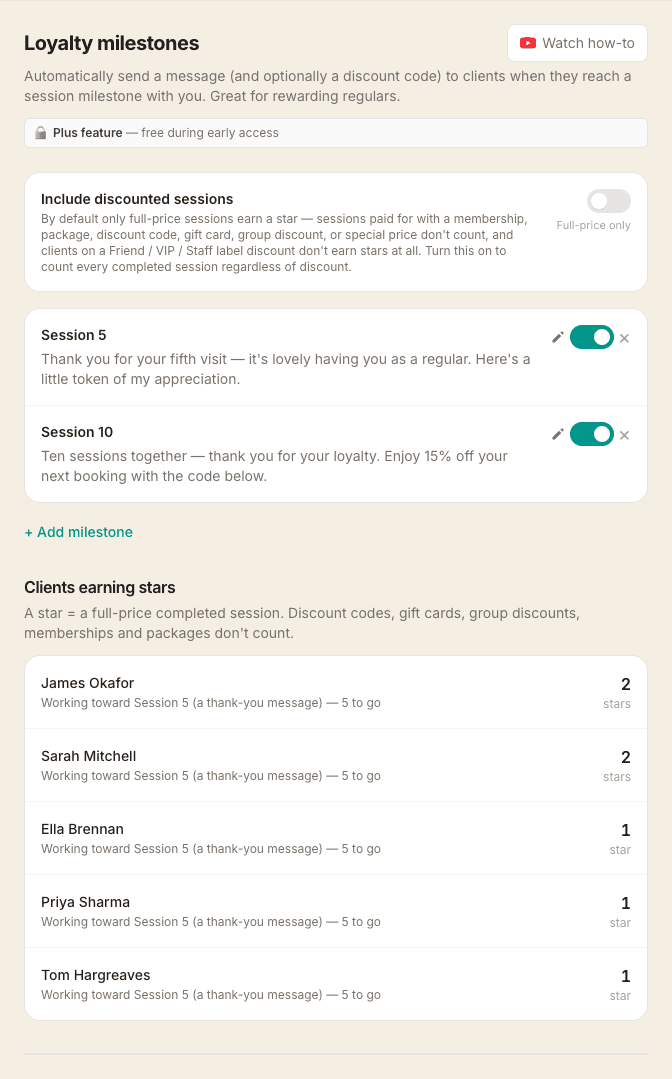
Go to Settings → Loyalty and click Add milestone. Configure:
- Session count — which appointment number triggers the reward (e.g. 5th, 10th)
- Message — a personal note sent to the client
- Discount — optional percentage off their next booking (e.g. 10%). A single-use discount code is generated automatically and included in the email
Milestones can be toggled active or inactive and deleted at any time.
How it works
When you mark an appointment as Completed, MassageHub counts how many appointments that client has completed with you. If the count matches a milestone, the client is automatically emailed your message — and their discount code if applicable.
Discount codes use the format LOYAL-XXXXXXXX, are single-use, and are valid for 12 months. They work at checkout just like any other discount code.
What counts as a session
Loyalty milestones count full-price sessions only by default. The principle is simple: a star is a thank-you for a client who paid your full advertised price, with no other discount stacked on top. So a session doesn't count toward stars if any of these applied:
- booked with a membership credit or treatment package
- back-to-back discount
- green / eco discount
- promo code or gift card
- you adjusted the price down manually for that booking
- the client has a label discount on their record (Friend / VIP / Staff with a percentage or fixed amount off — none of their bookings are full price, so none count)
If you'd rather count discounted sessions too, flip the Count membership and package sessions toggle at the top of the loyalty settings page. With the toggle on, every completed appointment counts regardless of how it was discounted. The card on each client's dashboard, and the "X stars" pill on their profile in your dashboard, reflect the same rule.
Ignoring short sessions per milestone
Each milestone has its own Minimum session length field on the add/edit form. Leave it at 0 (the default) for the current behaviour — every session length counts toward that milestone. Set it to e.g. 60 on a bigger reward and only completed sessions of 60+ minutes will move the needle toward that one: shorter sessions still happen, still get paid for and SOAP-noted as normal, they just don't count toward that milestone. Handy when you want a "thank you for your 5th visit" message to fire regardless of length, but a "10th-session 25% off" reward to need full-hour bookings.
Back-to-back bookings are summed before the check — so a 30-minute add-on tacked onto a 60-minute treatment counts toward a milestone with a 90-minute minimum.
Milestones with a minimum set show an amber "60+ min" pill in the list. The client's loyalty card adapts too: when the next reward they're working toward has a minimum, the card says "X more 60+ min sessions to go" so the rule is visible to them too.
What clients see
Clients with at least one milestone configured see a loyalty card on their dashboard. Each completed qualifying session adds a gold rubber-stamp star to the card, with empty circles showing how many more sessions until their next reward — the reward (e.g. "10% off") sits on the final circle.
The moment they hit a milestone, the card flips to show the discount code itself, right there on the dashboard, until they use it. Only one outstanding reward shows at a time so codes don't pile up. Counting carries on in the background — if they cross another milestone before redeeming, the next reward fires automatically the moment they redeem the current one. They never lose a reward they've earned.
Tracking who's earning stars
At the bottom of Settings → Loyalty you'll see a list of every client and how many stars they've collected, sorted by most-loyal first. Rows where a reward is outstanding are flagged so you can spot a client who might appreciate a personal nudge to come back and use it.
You'll also see a small "X stars" pill at the top of each client's profile page in your dashboard, next to their session count — a quick at-a-glance read on where that specific client is in your loyalty programme. The pill only shows once you have at least one active milestone configured, so it stays out of the way if you're not running loyalty.
When a client has earned a reward they haven't used yet, a small 🎁 appears on their upcoming appointments in your calendar, so you can spot it without opening anything. Open that appointment and you'll see an Apply loyalty voucher button — tap it to apply the earned discount to this booking if you'd like to. The 🎁 disappears once a discount is applied, and only shows on upcoming sessions that don't already have one.
Notes
- Each milestone fires once per client — when their count first hits that number
- Milestones are counted per therapist — sessions with other therapists on MassageHub do not count
- The client must have an email address on file to receive the milestone email