Control which events send you a notification — and whether you receive them by email, SMS, or both.
Where to find it
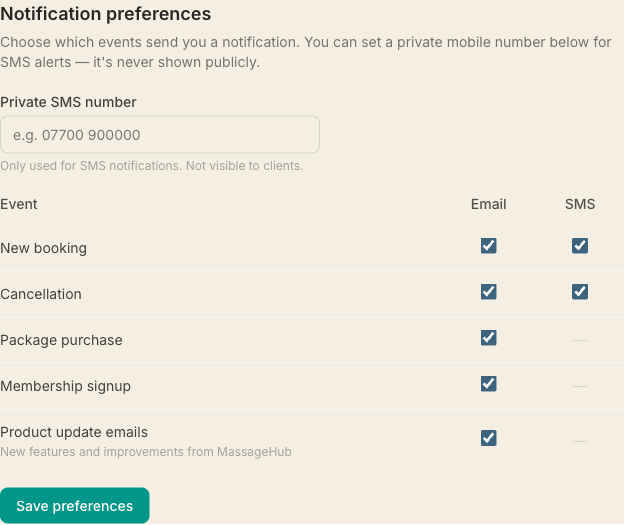
Go to Settings → Account and scroll down to Notification preferences. You'll see a grid with events as rows and channels (Email / SMS) as columns.
Which events can be toggled
- New booking — sent when a client completes a booking (single or back-to-back)
- Cancellation — sent when a client cancels via the client portal or SMS reply
- Package purchase — sent when a client buys a treatment package
- Membership signup — sent when a client signs up for a membership plan, whether you enrol them or they subscribe themselves
- Gift card purchase — sent when someone buys a gift card from your booking page, with the code, the value and who bought it. Cards you issue yourself in Settings → Promotions don't trigger it
Email notifications
Email notifications are sent to your account email address. All five event types support email.
SMS notifications
SMS notifications are available for new bookings and cancellations. To receive them, enter a Private SMS number in the same section — this number is never shown to clients or on your public profile. If you leave it blank, SMS notifications fall back to your public contact phone number (if one is set in Profile settings).
Defaults
All notifications are on by default. Uncheck any box you don't want, then click Save preferences.