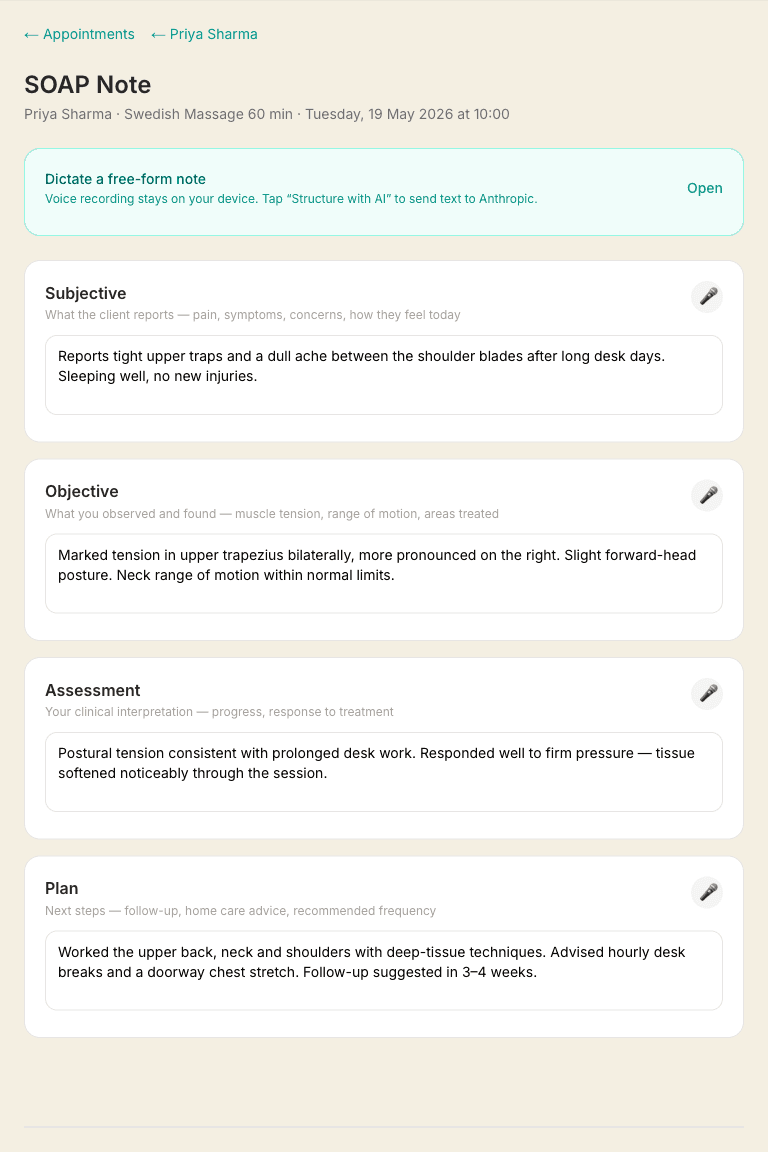
SOAP notes are clinical session notes with four sections: Subjective, Objective, Assessment, and Plan. They're stored encrypted and only visible to you.
The four sections
- Subjective — what the client reports (symptoms, concerns, how they feel)
- Objective — your clinical observations (posture, range of motion, tissue quality)
- Assessment — your clinical interpretation and findings
- Plan — what you did and what you'll do next time
Marking the areas you worked on
Above the four sections is a body map — a front figure and a back figure. Tap any area to mark it as one you treated, and tap it again (or tap its name in the list underneath) to remove it. Your marks save with the note, and the figure appears on the client's record under their latest note.
The R and L at the top of each figure are the client's own right and left, not yours — so on the front figure, their right arm is on your left. That is the same convention a paper body chart uses.
Areas are recorded by name rather than as a drawing, so a note reads “Lower back, Left calf” on screen, on your client record, and in your data export. It stays readable by anyone you hand it to, including an insurer or another practitioner.
It is the same body map your clients can fill in on an intake form (see Intake forms), so what they asked for and what you did are recorded the same way.
Voice dictation
Click the microphone icon on any section to dictate instead of typing. The audio is transcribed automatically. This is especially useful for writing notes between clients — speak for 30 seconds and you're done.
The first time you use it, your browser will ask for permission to use the microphone — tap Allow. If you accidentally block it, you can change it again from the padlock icon in your browser's address bar.
Dictation uses your browser's own speech recognition, which means the audio is sent to your browser provider (Google on Chrome, Apple on Safari) to be turned into text. If you would rather no audio left your device at all, type the note instead. Once the text is in your note it is encrypted at rest like everything else, and nothing is sent to our AI unless you tap “Structure into SOAP with AI”.
On the Android app, dictation isn't available.Android's in-app browser doesn't support speech recognition, so the microphone button will say so if you tap it. To dictate on an Android phone, open massagehub.app in Chrome instead. On iPhone it works inside the app as normal.
Auto-save
Notes save automatically a moment after you stop typing — there's no Save button to click. You'll see a brief “Saved” confirmation at the bottom of the page.
Reviewing the last session before the next one
When a returning client already has notes from a previous session, a Review last SOAP note link appears on their appointment — both in the appointment card on your calendar and on the Up next card on your dashboard as the session approaches. It shows the date of that note and opens it in one tap, so you can refresh on what you worked on before they arrive. Clients with no notes yet don't show the link.
Privacy and security
SOAP notes are encrypted before being stored. Nobody except you can read them — not even us. Keep this in mind: if you lose access to your account, notes cannot be recovered.