After a session you can note how much tension your client was carrying, on a simple 0 to 10 scale. It's a quiet way to track whether things are easing for them, visit by visit.
Where you'll find it
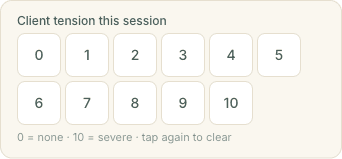
Open any completed appointment on your Appointments calendar and you'll see a Client tension this session row, just below the "How did that session feel?" energy check-in. The same row appears on that session's SOAP note page, so you can record it wherever you happen to be working. It only shows once a session is marked complete — the same moment the energy check-in appears.
Setting and clearing a score
Tap a number from 0 (no tension) to 10 (severe) to record it. It saves straight away, no separate save button. Tapped the wrong one? Just tap a different number. To remove a score entirely, tap the selected number again — it clears back to nothing.
A cleared score means "not recorded", which is different from a recorded 0. Zero is a real, meaningful reading — a client who arrived carrying no tension at all — so it's kept distinct from simply leaving the row blank.
Seeing it next time
When you next open an appointment for the same client, their most recent recorded score shows on the panel, for example Last tension: 7/10 · 3 Jun. It's a quick at-a-glance reminder of where they were last time, so you can see whether things are heading in the right direction.
It's private to you
The score you record at a session is just for you. Clients never see your figure, on their booking page, in their client portal, or anywhere else. Think of it as a note to yourself, alongside your SOAP notes.
Your clients can track their own tension too
Separately, every client with an account now has a Your wellbeing card in their client area, where they can log how much tension they're carrying on the same 0 to 10 scale and watch it change over time on a small chart. That's their own private diary between visits — you don't see their entries, and they don't see the score you note at a session. The two simply sit alongside each other.