If you already have a website, you don't have to retype everything to move to MassageHub. Paste your address and we'll read your site and fill in as much of your profile as we can, for you to check over.
Where to find it
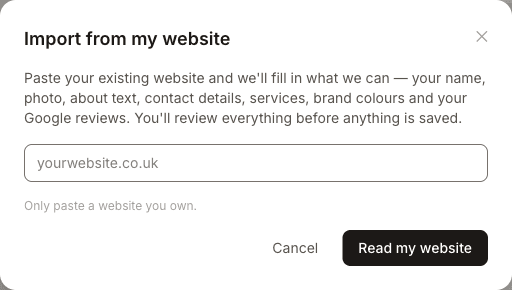
Go to Settings → Profile and tap Import from my website. Enter your website address and tap Read my website. It only takes a few seconds.
What we pick up
We look for your business name, photo or logo, your about text, phone, email and social links, your list of treatments with their lengths and prices, and your brand colours. We'll also try to find your business on Google so you can connect your Google rating and reviews in one tap — we show you the match first, so you only connect it if it's really you. How much we find depends on how your site is built — some sites we read almost completely, others only the basics. Opening hours aren't imported; you set those on your availability page.
You review before anything is saved
Nothing is saved automatically. We show you everything we found with a tick next to each item. Untick anything you don't want, and edit anything that isn't quite right — prices in particular are worth a quick check, as they can be read incorrectly. A treatment we're unsure about is highlighted so it's easy to spot. When you're happy, tap Use selected.
Your existing details are safe
Anything you've already filled in by hand is left untouched. If a detail is already set, we leave its tick off by default and label it, so importing never overwrites your own work. Services you already have are skipped rather than duplicated, so it's safe to run the import more than once.
If we can't read your site
Some websites — particularly ones built as a single app that loads everything with JavaScript — don't give us anything to read. If that happens, you'll see a friendly message and can simply add your details by hand as usual. Only ever paste a website you own.