You decide how hands-on you want to be. The app can just notify you, draft the charge for you to confirm, or take the fee automatically — all using the card the client saved when they booked. The default is Off, so nothing changes unless you turn it on.
Your booking terms and cancellation policy
Go to Settings → Payments and write your policy in Booking terms & cancellation policy. Clients booking through your booking page see it at the last step and have to tick I have read and agree to the terms and cancellation policy before they can continue. It is also the place for any wider terms and conditions you ask clients to accept, so you can paste your full T&Cs in alongside your cancellation wording. It is not shown for event sign-ups or for bookings you add yourself from your calendar.
The four modes
Go to Settings → Payments and scroll to Late cancellations & no-shows. Pick one:
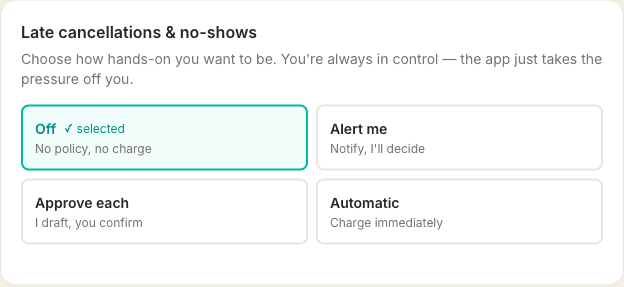
- Off — no policy, no charge, no notification. Current default for everyone.
- Alert me — I send you a push notification when a client cancels late or no-shows. You decide whether to charge manually.
- Approve each — I draft the charge with a proposed fee and it appears in an amber banner on your Calendar page. You click Charge, Waive, or Edit amount. If you don't act within your review window (default 2 hours, configurable), the charge fires automatically.
- Automatic — the charge goes through the moment the client cancels late or no-shows. No review, no delay. The client gets an apologetic email explaining what happened.
Setting the fee
Late cancels and no-shows have separate fee configuration, because they're different things: a late cancel might be 50% of the session, a no-show 100%. For each, pick:
- Percentage — e.g. 50% of the session price
- Flat fee (£) — e.g. £30 regardless of session length
- Deposit only — keep the deposit already paid at booking (if you take deposits) and don't charge any more
Set the late-cancellation window (how many hours before the appointment counts as "late"). 24 hours is typical.
The approval queue
When you use Approve each mode and a client cancels late, an amber card appears at the top of your Calendar page: "1 cancellation fee ready to review". Each row shows the client, service, proposed fee, and a live countdown until the auto-charge fires. Your three options:
- Charge — takes the fee immediately from the saved card
- Waive — no fee, the row disappears (good for regulars or genuine emergencies)
- Edit — adjust the amount before charging (e.g. knock off £10 as a gesture)
Marking a no-show
When a client doesn't turn up, open the appointment on your Calendar and tap No show. You'll get a quick confirm step explaining what's about to happen based on your chosen mode — then one more tap commits it. The appointment is marked no-show and your no-show fee policy runs the same way as late cancels: it alerts you, queues for review, or charges automatically on the saved card. Turned off or the client's exempt? Nothing is charged — the appointment is just marked.
AI cancellation assist (Pro & Plus)
On Pro or Plus you can turn on AI cancellation assist from the same panel. When a client cancels late or no-shows, Claude quickly reviews the incident — the client's tenure with you, their lifetime value, how many late cancels are on record, their stated reason, and the tone of your own policy text — and suggests Charge, Partial, or Waive with one sentence of reasoning. The suggestion appears right under the proposed fee in the amber review banner. You still decide — nothing fires automatically, this is just a quick second opinion to help you handle borderline cases consistently.
With AI Assist on, each row in the review banner also gets a Draft message button. One tap and Claude drafts a short, warm follow-up email from you to the client — personalised to their name, their stated reason, and whether you've charged, waived, or taken a partial fee. Nothing is sent automatically: you copy the draft, paste it into your own email, tweak it, and send. Useful for the cases where a cold transactional email isn't quite the right fit.
Last-minute reschedules
If a client tries to move a booking inside your late-notice window, it doesn't go through automatically — it becomes a request that you approve or decline. They see an amber warning explaining that and are reminded the cancellation policy still applies if they end up cancelling instead. You get a push, an email with one-click Approve / Decline buttons, and an amber banner on the Appointments dashboard with the same actions. Approve and the booking moves; decline and the original time stays in place — if they cancel then, your late-cancel policy runs as normal. This closes the loophole where a client could reschedule out of the window and then cancel for free.
VIP / exempt clients
On any client's detail page there's a toggle: Exempt from cancellation policy. Turn it on for regulars, family, friends — the policy will skip them regardless of mode.
What clients see
Clients see the exact policy — your window and the fee — on the booking page before they confirm, and again in their booking confirmation email. Wording is concrete, for example: "If you cancel within 24 hours of your appointment, 50% (£40) will be charged to the card on file." Your own wording (from Settings → Payments → Booking terms & cancellation policy) still appears alongside it, for any extra context or terms you want to add. They tick to acknowledge before they can continue.
The policy then follows them into the client portal — the upcoming-bookings list at /yourslug/my and the individual appointment page they reach from reminder emails both show it. Outside your cancel window it reads as a gentle reminder; inside the window it firms up to a concrete sentence like "Cancelling now will charge £30.00 to the card on file." Clients you've marked exempt see nothing.
Emails
- Client — fee charged: a warm, non-punitive email explaining the charge in line with the policy they agreed at booking. Slightly firmer wording for no-shows than for late cancels.
- Client — fee waived: a "good news — no charge" email when you click Waive. Keeps the relationship friendly.
- You — approval needed (Approve-each mode only): lands in your inbox the moment a pending fee is queued, with the amount and the auto-charge deadline. Two one-click buttons: Charge £X and Waive fee. Tap one, confirm on the next page, done — no logging in. The links are signed and expire at the auto-charge deadline, so they can't be used after the event has resolved. If you want to adjust the fee before charging, the "Open the dashboard to edit the amount" link takes you straight there.
Requirements
You need Stripe connected — see Setting up Stripe payments. The client must have booked through your booking page with a card saved (that happens automatically for any paid appointment).
Tips
- Start with Alert me mode for a week — see how often late cancels actually happen before flipping to Approve or Auto.
- Approve mode with a 2-hour delay is the sweet spot for most therapists — fire-and-forget if you're busy, but you can still intervene for genuine emergencies.
- Deposit-only mode is gentle and client-friendly — no surprise charges, you just keep what they already paid.