MassageHub sends appointment reminders automatically — you control the timing, the recipient, and the channel.
Setting up your reminder rules
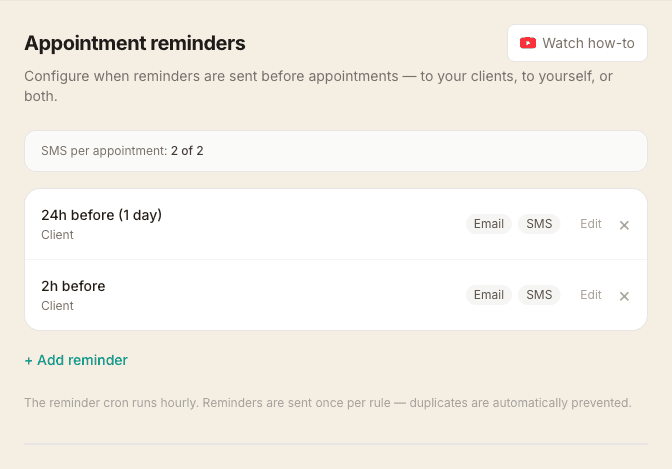
Go to Settings → Reminders to see your active rules. Each rule defines:
- Hours before — how far in advance the reminder is sent (e.g. 24 = 1 day, 48 = 2 days)
- Send to — your client, yourself, or both
- Channel — email, SMS, or both
- Custom message — an optional note added to that reminder (see below)
You can have multiple rules per appointment — for example, a 48-hour client email and a 2-hour reminder to yourself.
Default rule
New accounts start with a single rule: 24 hours before, to the client, via email and SMS. You can edit or add to this.
How reminders are sent
The cron runs hourly. Each rule is matched against upcoming appointments in a ±30-minute window around the target time. Each reminder is sent once per rule — duplicates are automatically prevented.
Adding a custom message to a reminder
Each reminder rule has an optional Custom message box. Whatever you type is added to that reminder every time it fires — a natural place for prep notes. Mobile therapists often use it to ask clients to clear a space and have a couple of clean towels ready; a clinic might add parking or buzzer instructions.
The message shows in full in the client's reminder email. In the text message version, emoji and special characters are removed and only the first ~120 characters are included, so a long note or a stray emoji can't quietly push your SMS into extra (charged) segments. If a rule also reminds you, your own email copy shows the note as a heads-up.
Adding a personal note to every client email
Separately from per-reminder messages, you can add a short note that appears at the bottom of all client reminder emails — for example, a standing set of parking instructions. Go to Settings → Account and look for Personal note in client emails.
Other notification settings
To control alerts for new bookings, cancellations, and other events, see Notification preferences.