You can let clients leave you an optional tip after a completed appointment. It's off by default, never pushy, and 100% of every tip goes to you — MassageHub takes no cut.
Turning it on
Tipping is off until you switch it on — your clients see nothing about it otherwise. To enable it, go to Settings → Payments and turn on Let clients tip you.
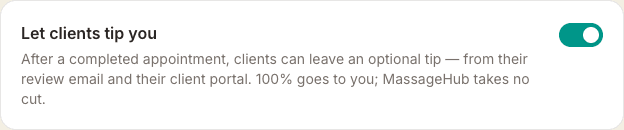
You'll need a way to be paid first. If you have neither Stripe connected nor an external payment URL set, the toggle stays disabled until you add one.
What your clients see
Once it's on, two quiet things happen after you mark an appointment Completed:
- The "How was your appointment?" review email gains a small, low-key line below the review button inviting the client to leave a tip — phrased as always optional, never expected.
- The next time the client opens their client area, a gentle, dismissible card offers the same. It won't nag — if they dismiss it, it stays dismissed.
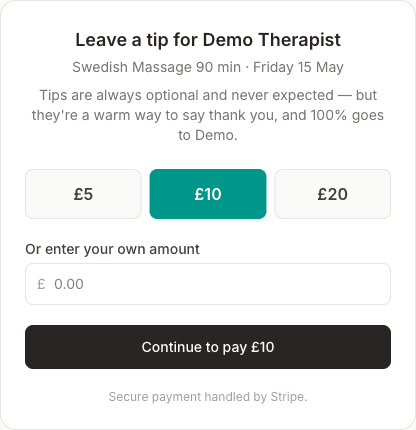
Both lead to a simple tip page showing a few suggested round-pound amounts based on what their appointment cost, plus the option to enter their own. The minimum tip is £1.
How you're paid
If you have Stripe connected, the client pays the tip there and then on a secure Stripe checkout page. The money lands in your Stripe account like any other payment, and appears as a separate Tips received figure on your Income dashboard — kept apart from your session revenue so your numbers stay clean.
If you only use an external payment URL (PayPal, Revolut, SumUp and the like), clients are sent to that page to tip. They enter the amount themselves, and because the payment happens outside MassageHub we can't confirm it — so external tips don't appear on your Income page. Connecting Stripe gives you the smoother, fully tracked experience.
When someone tips you
You'll know straight away. As soon as the payment goes through, MassageHub emails you — "Sarah left you a £10 tip" — and sends a notification to any device where you've turned notifications on. The money is already in your Stripe account by then; the alert is just so you hear about it rather than finding it on your Income page a week later.
If you'd rather not have the email, switch off Tip received under Settings → Account → Notifications. Tips still arrive and still show on your Income page — you just won't be emailed about them.
That setting covers the email only. The notification on your phone or computer is separate, and carries on. If you want to stop those as well, turn notifications off for MassageHub on the device itself — in your phone's settings, or in your browser's site settings.
Tips paid through an external payment URL can't trigger an alert, for the same reason they don't appear on your Income page: the payment happens outside MassageHub, so we never see it.
Good to know
- MassageHub takes nothing. Every tip is yours in full.
- Tip links expire after 30 days, in line with the review email.
- Tipping is genuinely optional for clients — it's only ever presented as a kind extra, never a charge.
- In the UK a tip is appreciated but never expected. This feature is built to respect that — turn it on only if it feels right for your practice.