If you're moving from another system, you can import your entire client list in one go — no need to re-enter hundreds of records by hand.
What you'll need
A CSV or Excel file with your client records. Most practice management systems (Fresha, Cliniko, Jane App, etc.) can export this from their reports or data export section.
How it works
Go to Clients and click Import clients. Pick the source — Fresha, Cliniko, or CSV / Excel / other — and upload your file. You review the extracted clients in a table before anything is saved.
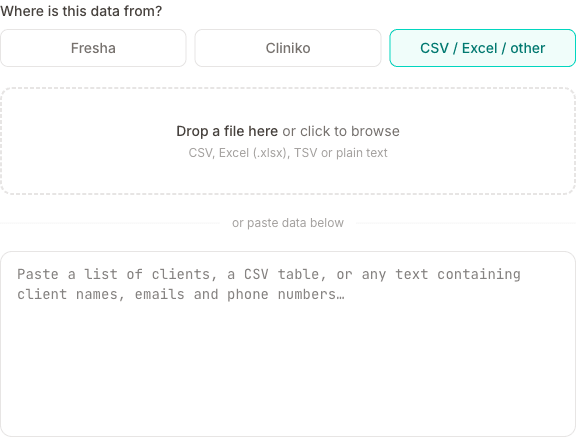
For Fresha we use a purpose-built parser that knows the exact export format, so it's instant (no AI step) — see Moving from Fresha for the full mapping. For Cliniko and other sources, AI reads your file and extracts names, emails, phone numbers, dates of birth, addresses, notes, marketing consent and any clients marked as blocked, regardless of how your file is structured.
Marketing consent is only picked up when your file actually says so, in a column such as "Accepts Marketing", "Marketing" or "Newsletter". If there is no such column, everyone is imported as not opted in, because we will not assume consent on your clients' behalf. If they had already agreed in your old system, you can select them on the client list afterwards and use Marketing on to switch them back on in one go.
What isn't imported
The importer brings across client records — who your clients are and how to reach them. It does not bring across past appointments, and there's currently no way to bulk-import appointment history from another platform. The same goes for clinical notes held in your old system, invoices and payment records, and photos or documents attached to a client there.
Keep your old account open (or download its export) for as long as you need the historic record. If you're moving because of your record-keeping obligations, note that your insurer or professional body may expect you to retain past treatment records for several years — exporting them to PDF before you close an account is worth doing regardless of which system you move to.
Adding past appointments by hand
If you only need a handful of recent sessions — enough to see when someone last came in, or to get their loyalty card to the right number of stars — you can add them manually after importing your clients:
- Import your clients first, so each session can be attached to the right record
- Go to Calendar and click + New appointment
- Pick the client and service, and set the date and time to when the session actually happened — past dates are allowed
- Leave Notify client unticked so nobody is emailed a confirmation for a session that's already been and gone
- Mark the appointment Completed
Backdating is safe to do. Completing a session that finished more than a week ago won't trigger a review request or a loyalty reward email — but it still counts towards the client's loyalty total, so their stars land in the right place and any reward they've earned reaches them on their next real visit.
Duplicates and re-importing
Clients are matched by phone number. If a client already exists, a brand new row isn't created — instead the "Do not book" flag on the existing record is refreshed from your file (everything else, like notes and address, is left alone). Marketing consent is deliberately not refreshed: once a client is in MassageHub, their consent only changes if they change it themselves, if they use an unsubscribe link, or if you change it from their record or the client list. That way a re-import can never quietly undo someone's unsubscribe, or wipe a decision you made yourself.
UK phone numbers
UK mobiles starting with 44 or +44 are normalised to the friendlier 07... form on import. Foreign numbers are left as they are.
Tips for a clean import
- If you used Fresha, just pick the Fresha source and drop the file in — no fiddling needed
- For other sources, make sure phone numbers are in a consistent format (the AI handles most variations)
- If your export has multiple tabs or sheets, combine them into one before importing
- The AI processes up to ~500 clients at once — for larger lists, split into batches (Fresha imports have no practical limit since they don't use AI)
Undoing an import
Right after the import finishes you can click Undo import to remove every newly-created client from that batch. The same is also available from History on the Clients page. Note: the flag refresh on existing clients isn't rolled back by Undo — only the rows that the import inserted are deleted.
See also: Moving from Fresha, Moving from Cliniko