MassageHub supports three ways clients can pay: Stripe (fully integrated card payments), an external payment URL (PayPal/Revolut/SumUp etc.), or cash on the day. You can enable more than one — clients pick from the options you've turned on. This article explains the trade-offs so you can choose the right mix.
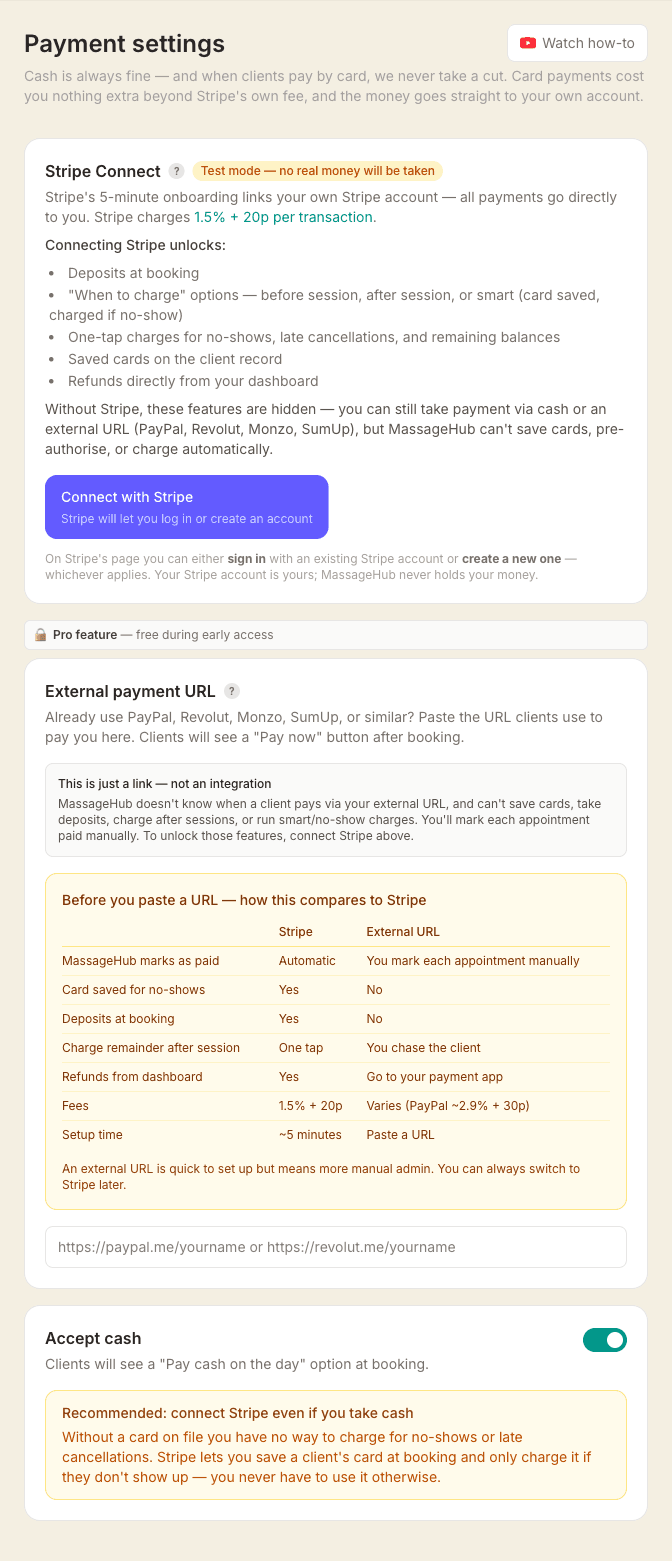
Quick comparison
| Stripe | External URL | Cash | |
|---|---|---|---|
| Paid status auto-updates | Yes | No — you mark each appointment | No — you mark each appointment |
| Card saved for no-shows | Yes | No | No |
| Deposits at booking | Yes | No | No |
| Refunds from dashboard | Yes (one click) | In your payment app | Handle in person |
| Fees per transaction | 1.5% + 20p | Varies (PayPal ~2.9% + 30p) | None |
| Setup time | ~5 minutes | Paste a URL | Toggle on |
You can enable any combination — Stripe plus cash is common, for example.
1. Stripe — card payments (recommended)
What happens at booking: The client enters their card details on Stripe's hosted checkout page. Depending on your charge timing setting, the card is either charged immediately or saved to be charged after the session. A deposit can be taken upfront.
What happens after the session: If the card was saved, you click Charge client now from the appointment panel and the full amount (or remainder after deposit) is taken with one tap. MassageHub automatically marks the appointment as paid.
What you do manually: Nothing — unless a client doesn't show, in which case you can charge the saved card for the no-show fee defined in your cancellation policy.
Limitations: Clients without cards can't use this path — offer cash alongside if that's a common case. Your first Stripe payout has a 7–14 day delay; ongoing payouts arrive in 2–3 business days.
See Setting up Stripe payments for the setup walkthrough, Booking deposits, and Issuing refunds.
2. External payment URL — PayPal, Revolut, SumUp
What happens at booking: If you haven't connected Stripe, the client taps Confirm & pay at the payment step — that opens your PayPal/Revolut/SumUp page in a new tab and confirms the booking at the same time. If you have connected Stripe, the card form comes first and your link sits underneath it as Pay online instead, which does the same thing. With Stripe connected it only appears when nothing is due at the moment of booking. If you take a deposit, or your When to charge is set to charge at booking, or you use booking requests, it isn't offered at all — each of those needs the money settled or the booking approved first, and an external link can't confirm either. In those cases you send them your link yourself afterwards. (The in-app Request payment button uses Stripe when you have it connected, so this would be a message or email from you.)
What happens after the session: Nothing automatic. MassageHub has no way to see whether the client actually paid — you need to check your external payment app and manually mark the appointment as paid in MassageHub.
What you do manually: Check every booking against your payment app. For any unpaid client, chase them up yourself. Tick the Paid box on the appointment once the money arrives.
Limitations: No saved cards, so no-shows cost you the full fee with no recovery path. No deposits, no post-session remainder charging, no refund integration. Clients who say they'll pay and then don't are your problem to chase.
Use this if you're only offering it as a secondary option, or if you're not yet ready to set up Stripe. You can always switch later.
3. Cash on the day
What happens at booking: The client sees an option to pay cash on the day and confirms their booking. No money changes hands online.
What happens after the session: The client pays you in person. MassageHub doesn't know about it automatically — you tick Paid on the appointment after each session.
What you do manually: Collect the cash, mark the appointment paid.
Limitations: No-shows are a real risk — the client has no commitment and nothing to lose. We strongly recommend connecting Stripe too, even if you mainly take cash, so you can save a card at booking specifically for no-show fees. You never have to charge it for normal sessions.
Which should I use?
- Just starting out: Connect Stripe. It takes 5 minutes and eliminates most of the admin.
- Mostly cash clients: Enable cash and Stripe. Cash for the session, Stripe card-on-file for no-show protection.
- Already use PayPal/Revolut: Keep using it as a secondary option if you like, but connect Stripe as your primary — the time saved on chasing payments is worth it.
Manually-booked appointments
The flows above apply to clients booking themselves online. When you book an appointment yourself from the calendar, see Collecting payment for manually-booked appointments — you can email the client a secure payment request from the appointment panel.